This post summarizes my YouTube demo where an EKS pod in Account A reads an object from an S3 bucket in Account B—without hard-coded access keys. Below you’ll find the why, the architecture, the minimal Terraform/Kubernetes you need, a tiny API snippet, and a quick “what can go wrong” checklist.
TL;DR
- Use IAM Roles for Service Accounts (IRSA) so pods can assume an IAM role via STS using short-lived credentials.
- Create an S3 bucket plus cross-account IAM role in Account B that trusts the OIDC provider from the EKS cluster in Account A (scoped to a single service account).
- Annotate your Kubernetes
ServiceAccountin Account A with the role ARN from Account B. - Your pod now calls S3 with no static keys; AWS injects short-lived credentials under the hood.
The learnings from this video are captured on my Youtube channel and specifically in the video below:
Why IRSA for Cross-Account?
In real environments, you often split concerns: platform/EKS in one account, shared data (like analytics or reference data) in another. Hard-coding access keys “works” but creates secret sprawl and long-lived credentials.
IRSA flips that on its head:
- No secrets to manage: creds are minted on demand by STS.
- Least privilege: scope down to a single service account and a narrow S3 policy.
- Short-lived: automatic credential rotation reduces blast radius.
Architecture at a Glance
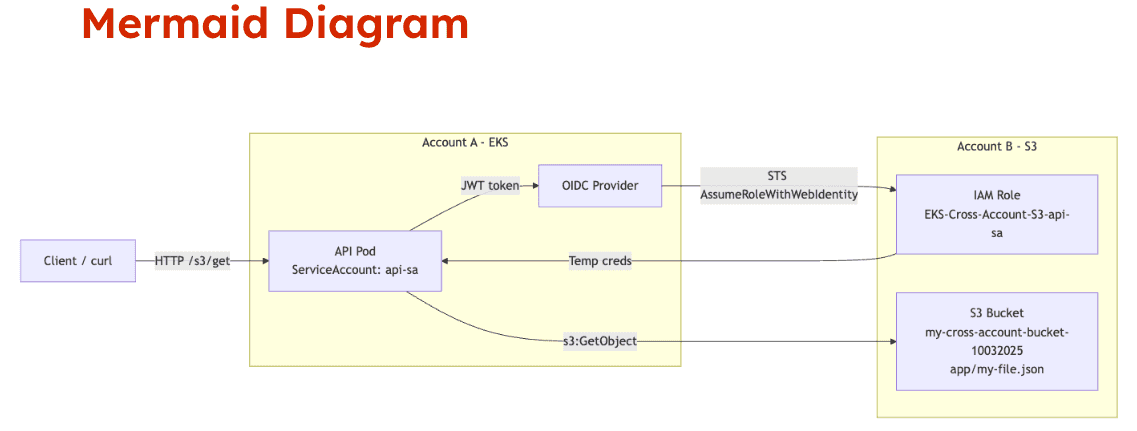
- Account A: EKS cluster runs API pods using a Kubernetes
ServiceAccountnamedapi-sa. - Account B: S3 bucket holds a JSON file; an IAM role (for example,
s3-reader-role) trusts the OIDC identity from the EKS cluster in Account A and grants read-only S3 permissions. - Flow: the pod calls the API → API SDK hits S3 → the SDK fetches a projected OIDC token from the pod → STS validates the token → issues temporary creds for the Account B role →
GetObjectsucceeds.
Account B: Bucket + Cross-Account Role (Terraform)
Below is a minimal sketch you can adapt. It creates:
- an S3 bucket
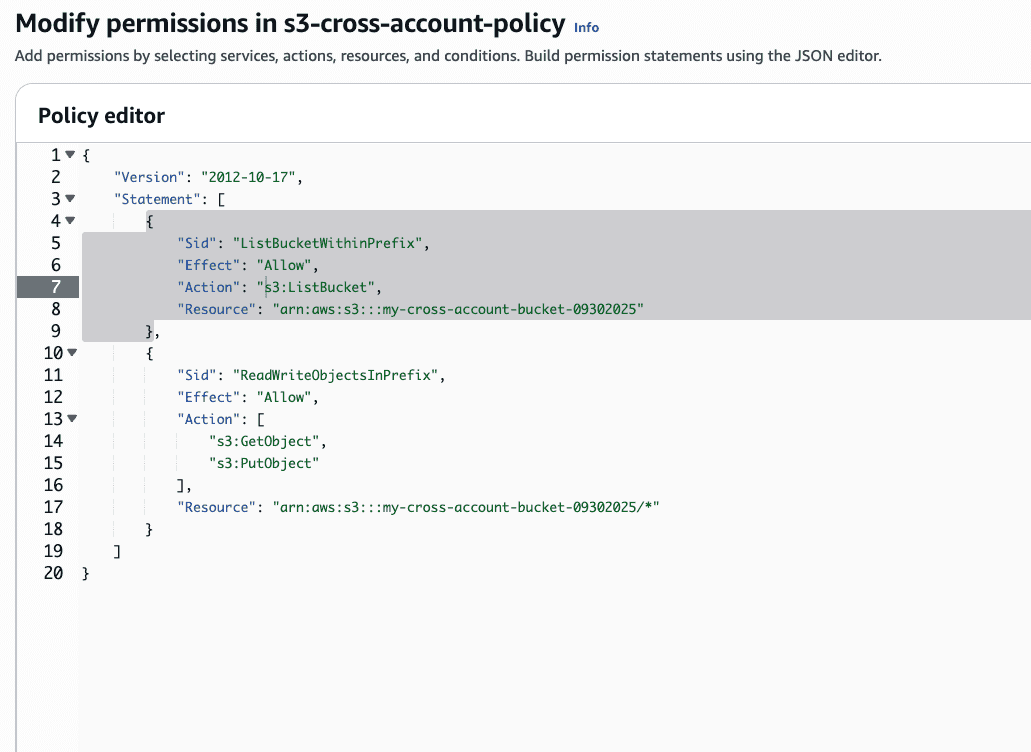
- a read policy scoped to that bucket
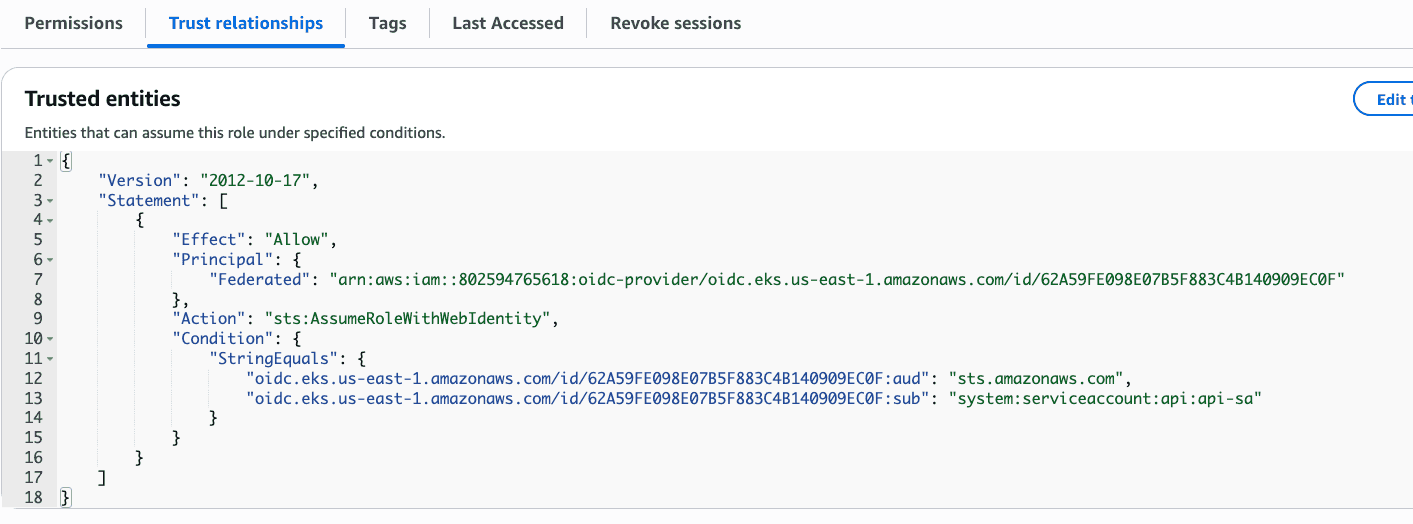
- an IAM role that trusts the EKS OIDC provider from Account A and only for
system:serviceaccount:default:api-sa
Replace placeholders such as ${var.account_b_id}, ${var.oidc_provider_arn_from_account_a}, and bucket names to match your setup.
# variables you’ll provide (via tfvars or otherwise)
variable "account_b_id" {}
variable "bucket_name" {}
variable "oidc_provider_arn_from_account_a" {}
variable "eks_oidc_issuer_url_without_https" {} # e.g. oidc.eks.us-east-1.amazonaws.com/id/EXAMPLED841

resource "aws_s3_bucket" "cross_account_data" {
  bucket        = var.bucket_name
  force_destroy = false
}

data "aws_iam_policy_document" "s3_readonly" {
  statement {
    sid     = "AllowReadObjects"
    actions = ["s3:GetObject", "s3:ListBucket"]
    resources = [
      aws_s3_bucket.cross_account_data.arn,
      "${aws_s3_bucket.cross_account_data.arn}/*"
    ]
  }
}

resource "aws_iam_policy" "s3_readonly" {
  name   = "s3-readonly-${var.bucket_name}"
  policy = data.aws_iam_policy_document.s3_readonly.json
}

# Trust policy for IRSA from Account A’s EKS OIDC provider
data "aws_iam_policy_document" "irsa_trust" {
  statement {
    actions = ["sts:AssumeRoleWithWebIdentity"]
    effect  = "Allow"
    principals {
      type        = "Federated"
      identifiers = [var.oidc_provider_arn_from_account_a]
    }
    condition {
      test     = "StringEquals"
      variable = "${var.eks_oidc_issuer_url_without_https}:sub"
      values   = ["system:serviceaccount:default:api-sa"]
    }
    condition {
      test     = "StringEquals"
      variable = "${var.eks_oidc_issuer_url_without_https}:aud"
      values   = ["sts.amazonaws.com"]
    }
  }
}

resource "aws_iam_role" "s3_reader_role" {
  name               = "s3-reader-role"
  assume_role_policy = data.aws_iam_policy_document.irsa_trust.json
}

resource "aws_iam_role_policy_attachment" "attach_s3_readonly" {
  role       = aws_iam_role.s3_reader_role.name
  policy_arn = aws_iam_policy.s3_readonly.arn
}
You don’t need a bucket policy unless you already have explicit deny statements or want to constrain things further. The role’s identity-based policy is sufficient for typical
GetObjectaccess.
Account A: Annotate the ServiceAccount
Annotate the service account with the Account B role ARN. Your deployment should use this service account.
apiVersion: v1
kind: ServiceAccount
metadata:
  name: api-sa
  namespace: default
  annotations:
    eks.amazonaws.com/role-arn: arn:aws:iam::<ACCOUNT_B_ID>:role/s3-reader-role
Apply it, then ensure your Deployment uses serviceAccountName: api-sa:
apiVersion: apps/v1
kind: Deployment
metadata:
  name: api
spec:
  replicas: 2
  selector:
    matchLabels:
      app: api
  template:
    metadata:
      labels:
        app: api
    spec:
      serviceAccountName: api-sa
      containers:
        - name: api
          image: yourrepo/yourimage:tag
          env:
            - name: BUCKET_NAME
              value: your-cross-account-bucket
Roll it out:
kubectl apply -f serviceaccount.yaml
kubectl apply -f deployment.yaml
kubectl rollout status deploy/api
API: A Minimal /s3/{key} Endpoint (Go)
With IRSA in place, the AWS SDK will source temporary credentials transparently. You only need the bucket name—no keys.
// go.mod should use AWS SDK for Go v2
// require (
//   github.com/aws/aws-sdk-go-v2 vX
// )

package handlers

import (
  "context"
  "io"
  "net/http"
  "os"

  "github.com/aws/aws-sdk-go-v2/aws"
  "github.com/aws/aws-sdk-go-v2/config"
  "github.com/aws/aws-sdk-go-v2/service/s3"
  "github.com/gorilla/mux"
)

func GetS3Object(w http.ResponseWriter, r *http.Request) {
  key := mux.Vars(r)["key"]
  bucket := os.Getenv("BUCKET_NAME")
  if bucket == "" || key == "" {
    http.Error(w, "missing bucket or key", http.StatusBadRequest)
    return
  }

  ctx := context.Background()
  cfg, err := config.LoadDefaultConfig(ctx)
  if err != nil {
    http.Error(w, "config error", http.StatusInternalServerError)
    return
  }

  client := s3.NewFromConfig(cfg)
  out, err := client.GetObject(ctx, &s3.GetObjectInput{
    Bucket: aws.String(bucket),
    Key:    aws.String(key),
  })
  if err != nil {
    http.Error(w, err.Error(), http.StatusBadGateway)
    return
  }
  defer out.Body.Close()

  w.Header().Set("Content-Type", "application/octet-stream")
  io.Copy(w, out.Body)
}
Test the Endpoint
Run the curl command and you should see the object stream back from Account B:
curl -s http://<your-api>/s3/config.jsonDemo Recap
- Provision: Terraform creates the bucket and an IAM role in Account B that trusts Account A’s EKS OIDC provider and only your
api-sa. - Annotate: Kubernetes service account in Account A points at that role ARN.
- Run: The pod calls S3; STS issues temporary credentials; the request succeeds with no static keys stored in code or cluster secrets.
Common Gotchas (Checklist)
- OIDC issuer mismatch: The issuer URL in your trust policy must match the EKS cluster’s issuer exactly (and the trust condition uses the version without
https://as shown above). - Wrong sub or namespace:
system:serviceaccount:<namespace>:<name>must match yourServiceAccountprecisely. If you move namespaces later, update the trust policy. - Wrong audience: Keep
aud: sts.amazonaws.comin the trust policy conditions. - Missing serviceAccountName: Your Deployment must use the annotated service account; otherwise IRSA won’t attach.
- Explicit bucket deny: If you have a bucket policy with deny statements, ensure it doesn’t block your role. Identity policy alone is typically enough unless you’ve hardened the bucket with denies.
- Local testing confusion: Locally you might have credentials in
~/.aws. In-cluster, rely on IRSA; avoid shipping fallback environment variables that reintroduce static keys.
Wrap-Up
That’s the full path to give an EKS pod in Account A scoped, temporary access to an S3 bucket in Account B using IRSA + STS—no long-lived credentials, and clean blast-radius boundaries. If you’re building multi-account architectures, this pattern should be your default for AWS API access from pods.
If this helped, the full walkthrough is in the video—likes/subscribes always appreciated. And if you try this pattern, tell me what you scoped in your role and whether you needed any special bucket policy constraints.